yooncoms Archive
A content streaming solution that encodes uploaded video on the server for real-time playback
- yooncoms Archive: video upload,
conversion, and streaming in one solution -
Optimized for real-time video through an HTML5 player, it is a multimedia solution built for
integrated management, making it easy to distribute and share across departments and users.
Key Features

- Easy-to-Use Encoding API
- It provides media server APIs for encoding requests and progress monitoring, with an intuitive structure that's easy to pick up.
- Fast Conversion, High-Quality Playback
- Using the H.264 codec for strong streaming performance over the internet, it delivers high-quality video.
- Plays on Any Device or Screen
- Upload once and play on any device, streaming high-resolution VOD without interruptions.
- Encoding Server Resource Allocation
- You can manage overall server load by capping the CPU cores used for encoding, and monitor encoding status in real time.
Services Provided by Yooncoms Archive
- Video Upload & Encoding
-
- Video file upload
- Server-side encoding
- Original video sent to the server, then encoded
- Supports a wide range of input formats (ASF, AVI, WMV, FLV, MOV, MP3, MP4, MPEG-1, MPEG-4, OGG, WebM, etc.)
- Single MP4 output based on H.264
- Media Security Authentication Software (Optional)
-
- Blocks illegal viewing via web URL hacking at the source
- Protects streaming packets and prevents original content leaks
- Prevents unauthorized copying and controls illegitimate access
- Live Streaming (Optional)
-
- High-quality live streaming powered by an HD codec with streaming and buffering engines
- Crisp, high-resolution video on web and mobile
- Multi-channel service and management
- Video Streaming Software (Optional)
-
- Real-time media server supporting web and smartphone streaming
- Video and audio settings adjustable via configuration files
- Video Editing
-
- Trim and merge videos
- Capture from the player
- Video Management
-
- Encoding status tracking by date
- Content upload and management
- Thumbnail extraction and media management
- Preset configuration and logs
yooncoms Archive uses Tigensoft's engine.
System Diagram
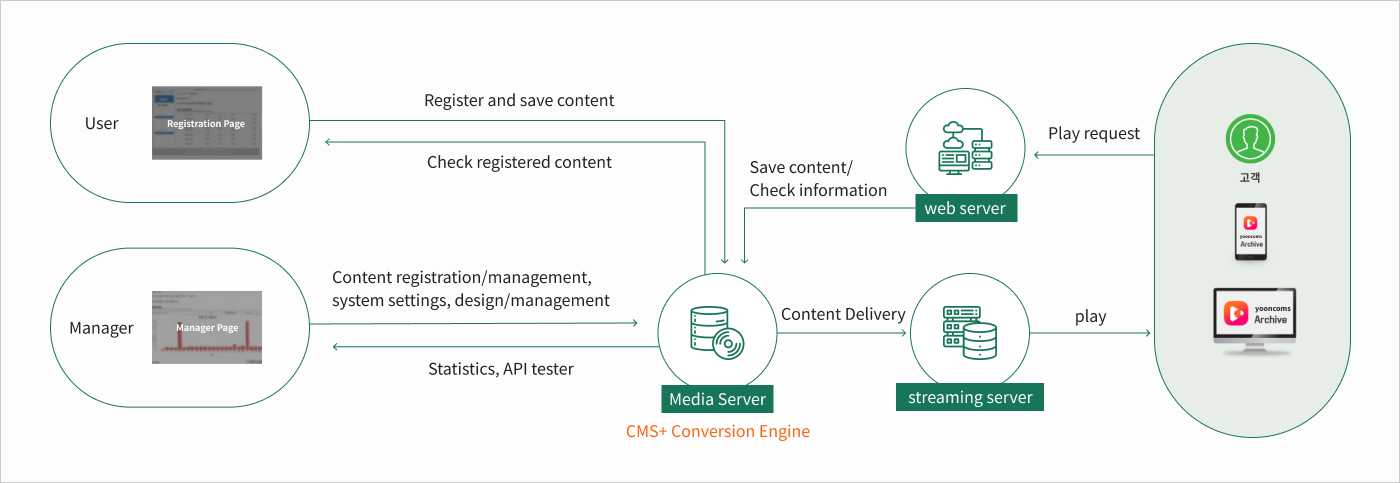
Product Architecture

-
- Upload
- The created video file is sent to the server and uploaded
-
- Movie File Play
- Call and play the video file, then select the section to convert
-
- Converter
- Automatically applies the length and resolution for conversion, then converts to MP4 based on those values
-
- HTML5 Player
- Plays MP4 files stored on the server, with controls such as play, pause, stop, full view, and default view
-
- System Management
- Admin system for video upload, boards, media settings, and more
-
- Media Server Security (*Optional)
- Media server security authentication. Blocks illegal viewing via URL hacking at the source, prevents streaming packet capture, and stops original content leaks.
-
- HONGIKINGAN CMS (*Optional)
- Integrated content management system (content and multimedia), with content registration and management, plus classification and category management
- Learn More
Use Case

Anti-Corruption & Civil Rights Commission (ACRC)
- Adopting Yooncoms Archive for the e-People file management system
- To address issues such as growing file sizes and slow speeds with e-People's multimedia files, the Anti-Corruption & Civil Rights Commission adopted Yoon Communications Archive. Now multimedia files can be uploaded, converted (compressed), and played in the server environment without separate downloads, improving the experience for citizens filing complaints.

System Requirements
- Supported Servers
- Microsoft Windows Server 2008 or later
- Microsoft Windows 7, 10 or later
- Linux CentOS 6.X or later
- Linux Red Hat 6.X or later
- Ubuntu
- macOS
- Supported Client
- PC: Latest versions of Chrome, Edge, Firefox, and Safari
- Mobile: Latest versions of Android and iOS
FAQ
Q.
Can we migrate our existing VOD content without any data loss?
A.
Yes. You can separate from your existing media server and migrate without losing any video data.
Q.
What are the recommended server specifications?
A.
The recommended specifications are: CPU 8 cores, Memory 16GB, HDD 1.2TB, and redundant power supply.
Q.
Does it support automatic encoding?
A.
AWhen you upload a video to the server, it is automatically encoded and played in real time.
Q.
Can it integrate with other solutions?
A.
Yes. We provide APIs for integration with other solutions.
Q.
Can I edit videos?
A.
Yes. It offers editing features such as trimming and merging.